Difference between revisions of "Extensions:User Quicklinks"
(User Quicklinks extension made.) Tag: 2017 source edit |
m (Fixing images...) Tag: 2017 source edit |
||
| Line 13: | Line 13: | ||
== Images == | == Images == | ||
<gallery> | <gallery> | ||
| − | File: | + | File:Quicklinks Edit Preview.png|alt=The quicklinks page showing user-inputted quicklinks for Items and Traits|The page users can access to edit their quicklinks, featuring the ability to add links, edit existing links, delete links, and reorder them. |
| − | File: | + | File:Quicklinks Dropdown Preview.png|alt=The username dropdown with an additional link to the quicklinks page, as well as the user's own quicklinks for Items and Traits|A preview of the username dropdown menu featuring the user's personal quicklinks above the logout button. |
</gallery> | </gallery> | ||
== Troubleshooting == | == Troubleshooting == | ||
You can find me in, or ask for help, in the Lorekeeper Discord. | You can find me in, or ask for help, in the Lorekeeper Discord. | ||
Revision as of 19:05, 18 August 2025
{{Extensioninfobox|title=User Quicklinks|desc=Allows users to define personal quicklinks for ease of access|auth=Min|status=stable|github=extension/user-quicklinks}
A small extension that allows users to add and order a set of personal quicklinks (both on-site and off-site). By default this displays above the 'Logout' link in the username dropdown menu, but can be configured elsewhere (just remember to put it in an auth check).
Installation
Pull the branch and resolve any merge conflicts. Afterwards, you can run the following commands:
php artisan migrate
php artisan optimize (x2)
Configuration
You can move around where the quicklinks appear, just remember to use an auth check so visitors to your site don't get an error.
Images
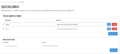
The page users can access to edit their quicklinks, featuring the ability to add links, edit existing links, delete links, and reorder them.
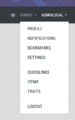
A preview of the username dropdown menu featuring the user's personal quicklinks above the logout button.


Troubleshooting
You can find me in, or ask for help, in the Lorekeeper Discord.

