Difference between revisions of "Extensions:Sales Image"
m (→Images) Tag: 2017 source edit |
m (Notice colours...) Tag: 2017 source edit |
||
| (3 intermediate revisions by the same user not shown) | |||
| Line 1: | Line 1: | ||
{{Extensioninfobox|title=Sales Image|desc=Allows the uploading of a single focal image to sales posts|auth=Min|status=stable|github={{Github|user=liwoyadan|branch=extension/sales-image}}|LKVer=3.0.0|migration=yes|package=no}} | {{Extensioninfobox|title=Sales Image|desc=Allows the uploading of a single focal image to sales posts|auth=Min|status=stable|github={{Github|user=liwoyadan|branch=extension/sales-image}}|LKVer=3.0.0|migration=yes|package=no}} | ||
| − | + | {| style="margin: 4px auto; width: 80%; border: 1px solid #c45474; background: #e6a5be;" | |
| + | |- | ||
| + | | '''<u>NOTICE FOR THOSE UPDATING TO DEVELOP (v3.1.0) AFTER MAY 27th, 2025:</u>''' | ||
| + | |- | ||
| + | | The active develop branch (what is being worked on to become v3.1.0) since May 27th, 2025 has integrated a near-identical feature that implements header images on sales post (as well as news posts and pages). This is a separate code history than this extension - meaning it was not the Sales Image extension that was merged into develop but code made independently from it. Please be aware that if you have previously installed the Sales Image extension to be prudent in double-checking your changed files for any duplicated functions; you will also need to adjust the migration as well otherwise migrating will error due to some columns already existing for sales in the database. | ||
| + | |- | ||
| + | |} | ||
Allows staff to upload a single focal image to sales post that will be displayed on top of the sales's text in it's own box. Handy if you wanted to display a big batch image as a focus rather than multiple character thumbnails and/or having the image be within the sales's body text. | Allows staff to upload a single focal image to sales post that will be displayed on top of the sales's text in it's own box. Handy if you wanted to display a big batch image as a focus rather than multiple character thumbnails and/or having the image be within the sales's body text. | ||
| Line 6: | Line 12: | ||
Image file type supported for the focal image is PNG. | Image file type supported for the focal image is PNG. | ||
| + | |||
| + | There is a version of this extension that integrates it with [[Extensions: Sales Widget]] so that the sales widget may display focal images if set. You can find this extension on Github on the branch https://github.com/liwoyadan/lorekeeper/tree/extension/sales-image-widget and a preview of the widget displaying a focal image in the images section below. | ||
== Installation == | == Installation == | ||
Pull the branch and resolve any merge conflicts. Afterwards, you can run the following commands: | Pull the branch and resolve any merge conflicts. Afterwards, you can run the following commands: | ||
| Line 21: | Line 29: | ||
File:Sales Image One.png|alt=A Lorekeeper sales post with a focal image displaying three different cats and no attached characters|The default setting of the extension showing a single focal image on the top of a sales post, beneath the title, with no attached characters visible. | File:Sales Image One.png|alt=A Lorekeeper sales post with a focal image displaying three different cats and no attached characters|The default setting of the extension showing a single focal image on the top of a sales post, beneath the title, with no attached characters visible. | ||
File:Sales Image Two.png|alt=A Lorekeeper sales post with a focal image displaying three different cats and two attached character thumbnails|The alternate setting of the extension showing a single focal image on the top of a sales post, beneath the title, with attached characters visible. | File:Sales Image Two.png|alt=A Lorekeeper sales post with a focal image displaying three different cats and two attached character thumbnails|The alternate setting of the extension showing a single focal image on the top of a sales post, beneath the title, with attached characters visible. | ||
| + | File:Sales Image Three.png|alt=A default sales widget displaying one sales post on top with a character thumbnail and another sales post beneath it with a focal image instead|The sales image and sales widget extension integrated together, showing the sales widget displaying one sales post with an attached character and no focal image and another sales post showing a focal image instead. | ||
</gallery> | </gallery> | ||
== Troubleshooting == | == Troubleshooting == | ||
You can ask for help in the Lorekeeper Discord. | You can ask for help in the Lorekeeper Discord. | ||
Latest revision as of 18:04, 2 June 2025
| Description | Allows the uploading of a single focal image to sales posts |
|---|---|
| Author(s) | Min |
| Status | stable |
| Github | extension/sales-image |
| LK Version | 3.0.0 |
| Contains a Migration | |
| NOTICE FOR THOSE UPDATING TO DEVELOP (v3.1.0) AFTER MAY 27th, 2025: |
| The active develop branch (what is being worked on to become v3.1.0) since May 27th, 2025 has integrated a near-identical feature that implements header images on sales post (as well as news posts and pages). This is a separate code history than this extension - meaning it was not the Sales Image extension that was merged into develop but code made independently from it. Please be aware that if you have previously installed the Sales Image extension to be prudent in double-checking your changed files for any duplicated functions; you will also need to adjust the migration as well otherwise migrating will error due to some columns already existing for sales in the database. |
Allows staff to upload a single focal image to sales post that will be displayed on top of the sales's text in it's own box. Handy if you wanted to display a big batch image as a focus rather than multiple character thumbnails and/or having the image be within the sales's body text.
Comes with an additional site setting that allows you to choose if only the focal image (if set) is displayed or if the focal image is displayed along with all attached characters.
Image file type supported for the focal image is PNG.
There is a version of this extension that integrates it with Extensions: Sales Widget so that the sales widget may display focal images if set. You can find this extension on Github on the branch https://github.com/liwoyadan/lorekeeper/tree/extension/sales-image-widget and a preview of the widget displaying a focal image in the images section below.
Installation
Pull the branch and resolve any merge conflicts. Afterwards, you can run the following commands:
php artisan migrate
php artisan add-site-settings
php artisan optimize (x2)
Configuration
There is a sales_image_display site setting. Setting it to 0 (default) will only show the focal image if it is uploaded. Setting it to 1 will show the focal image along with all attached characters. If no focal image is uploaded or it is removed, then it will simply display attached characters (if any).
Images

The default setting of the extension showing a single focal image on the top of a sales post, beneath the title, with no attached characters visible.

The alternate setting of the extension showing a single focal image on the top of a sales post, beneath the title, with attached characters visible.
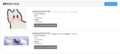
The sales image and sales widget extension integrated together, showing the sales widget displaying one sales post with an attached character and no focal image and another sales post showing a focal image instead.


Troubleshooting
You can ask for help in the Lorekeeper Discord.

