Difference between revisions of "Extensions:Cultivation"
m Tag: 2017 source edit |
(preview images added) Tag: 2017 source edit |
||
| Line 41: | Line 41: | ||
File:cultivation_unlocked.png|alt=The display when a cultivation area has been unlocked by a user.|The display when a cultivation area has been unlocked by a user. | File:cultivation_unlocked.png|alt=The display when a cultivation area has been unlocked by a user.|The display when a cultivation area has been unlocked by a user. | ||
File:cultivation_plot_one.png|alt=A single plot made inside an unlocked cultivation area.|A single plot made inside an unlocked cultivation area. | File:cultivation_plot_one.png|alt=A single plot made inside an unlocked cultivation area.|A single plot made inside an unlocked cultivation area. | ||
| − | File: | + | File:prepate_plot_modal.png|alt=The modal when clicking on a newly made plot in order to prepare it for a seed.|The modal when clicking on a newly made plot in order to prepare it for a seed. |
File:cultivated_plot_modal.png|alt=The modal of a prepared plot without a seed planted in it yet, showing options to begin cultivating a seed item or to re-prepare the plot.|The modal of a prepared plot without a seed planted in it yet, showing options to begin cultivating a seed item or to re-prepare the plot. | File:cultivated_plot_modal.png|alt=The modal of a prepared plot without a seed planted in it yet, showing options to begin cultivating a seed item or to re-prepare the plot.|The modal of a prepared plot without a seed planted in it yet, showing options to begin cultivating a seed item or to re-prepare the plot. | ||
File:tend_plot_modal.png|alt=The modal of a plot with a seed planted in it, allowing a user to tend to it once per day.|The modal of a plot with a seed planted in it, allowing a user to tend to it once per day. | File:tend_plot_modal.png|alt=The modal of a plot with a seed planted in it, allowing a user to tend to it once per day.|The modal of a plot with a seed planted in it, allowing a user to tend to it once per day. | ||
| + | File:cultivation_day_one.png|alt=A plot with a seed item planted on the first day of growth.|A plot with a seed item planted on the first day of growth. | ||
| + | File:exploration_tag.png|alt=The exploration item tag in the admin panel that allows you to set an unlockable cultivation area.|The exploration item tag in the admin panel that allows you to set an unlockable cultivation area. | ||
| + | File:seed_tag.png|alt=The seed item tag in the admin panel that allows you to set how many days for each stage of growth as well as rewards for harvest once fully grown.|The seed item tag in the admin panel that allows you to set how many days for each stage of growth as well as rewards for harvest once fully grown. | ||
| + | File:tool_tag.png|alt=The tool item tag in the admin panel that allows you to set what kind of plot the tool creates.|The tool item tag in the admin panel that allows you to set what kind of plot the tool creates. | ||
</gallery> | </gallery> | ||
Latest revision as of 16:31, 2 March 2025
| Description | Allows users to cultivate items of any kind within cultivation areas by tending to them each day. |
|---|---|
| Author(s) | Cylunny |
| Status | Stable |
| Github | extension/cultivation |
| LK Version | 2.1.2 |
| Contains a Migration | |
Cultivation adds the functionality of allowing users to unlock areas and create plots within them. Plots can be planted with a seed item, allowing it to grow via daily user interaction before granting the user a reward. Number of days required for growth, amount of plots able to be tended by a user in a day, amount of areas that can be unlocked by a user, and so on are all customizable.
Installation
Pull & merge conflicts. Afterwards, run the following commands:
php artisan migratephp artisan add-site-settingsphp artisan update-extension-trackerphp artisan optimizex2 (only if on live; if you are on local, runphp artisan optimize:clearonce instead)
Configuration
This extension adds three additional site settings in the admin panel:
cultivation_plot_usability(default 0), do plots become unusable once an item was cultivated? Whether or not a user needs to prepare them again or not. (0 = No, 1 = Yes)cultivation_care_cooldown(default 0), how many plots can a user tend to in a day? (0 = Unlimited)cultivation_area_unlock(default 0), how many areas can a user unlock at the same time? (0 = Unlimited)
Usage
As an admin you will have to set up the following things first via admin panel:
- Create cultivation areas with basic fields + what plots can be prepared here via tool item
- Plots themselves, with basic info + images for each stage + what seed items can be planted there
- Item tag for exploration items (unlocks an area)
- Item tag for tool items (creates a specific type of plot)
- Item tag for seed items (actually plants something and starts cultivation) with how long each stage takes in days, what item(s) are harvested once ready + optional specific "ready for harvest" image
Users will have:
- A page with different locations they can cultivate in
- Each area has an amount of plots to cultivate seeds
- Plots go through different stages: unprepared, ready for cultivation, cultivating and ready for harvest
- Users need items to progress between the stages, exploration items to gain access to a cultivation area, tools to prepare a plot, seeds to start cultivating something
- They need to tend to the plots once a day to progress them until they are ready for harvest
- When harvesting, user will be awarded the corresponding fully grown item/set reward
- A guide that automatically lists what plot can cultivate which item etc
Previews
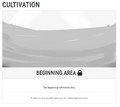
The display when a cultivation area has yet to be unlocked by a user.
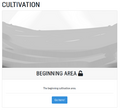
The display when a cultivation area has been unlocked by a user.

A single plot made inside an unlocked cultivation area.
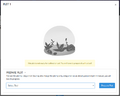
The modal when clicking on a newly made plot in order to prepare it for a seed.
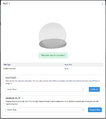
The modal of a prepared plot without a seed planted in it yet, showing options to begin cultivating a seed item or to re-prepare the plot.
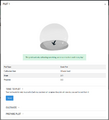
The modal of a plot with a seed planted in it, allowing a user to tend to it once per day.

A plot with a seed item planted on the first day of growth.

The exploration item tag in the admin panel that allows you to set an unlockable cultivation area.
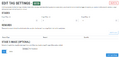
The seed item tag in the admin panel that allows you to set how many days for each stage of growth as well as rewards for harvest once fully grown.

The tool item tag in the admin panel that allows you to set what kind of plot the tool creates.


Troubleshooting
If you run into any issues, you can ask for help in the Lorekeeper Discord server.

